Analysis
Overview
The inplace editor provides functionality for editing text into the frame where the same text is laid out. Currently editing functionality is present, but the cursor position can be changed only with left and right arrows.
Task requirements
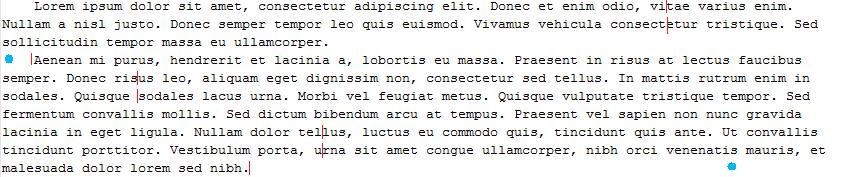
- The cursor position should be changeable by mouse click on text area.
- When the user has clicked in the text, the cursor is placed there.
- When the user has clicked in the text area, but not in the text, the cursor is placed as near as possible to the position where there is text.
Task result
Code.
Implementation idea

(Also shows behavior on up/down arrows) With red is the carriage, with blue dots is mouse click.
Related
How to demo
Show navigation in sample text.
Design
Mouse click navigation
Mouse click navigation logic is going to be placed in the event handling method of the HotTextPlaceLogic class.
It is going to use the modified getHitPos() method present in HotTextLayout for calculating the closest character position to the mouse click position (in relative coordinates).
The method finds the line (area) of text, that collides with the mouse position, then iterates trough the character positions in the line to find the one closest (so in the case there are no characters near the horizontal mouse coordinate, the caret will be placed after the last character of the line).
The caret position will also have additional calculations to correct the specific case when the user clicks near the middle of a character (in other words, the mouse arrow collides with the character):

Red is the mouse click position, blue is where the caret will be placed after the calculation.
How to demo
Click anywhere near the text content on a frame. The caret should be placed to a new position as explained above.
Implementation
(Describe and link the implementation results here (from the wiki or the repository).)
Testing
(Place the testing results here.)
Comments
(Write comments for this or later revisions here.)
Attachments
- textpos.jpg (50.7 KB) - added by deyan 16 years ago.
- mousepoint.PNG (1.2 KB) - added by dancho 16 years ago.